Modernline: The Handwritten Font for Elegant, Modern Design
In the crowded world of typography, finding a font that feels both personal and polished can be a challenge. Many handwritten fonts lean too casual, making them unsuitable for professional work. Others feel stiff and lose the human touch. Modernline strikes a rare balance. It’s a premium font that delivers the warmth of a hand-lettered script with the clean sophistication needed for contemporary branding and design projects. This isn’t just another script font; it’s a versatile design asset built for clarity and charm.
Understanding Modernline's Visual Character
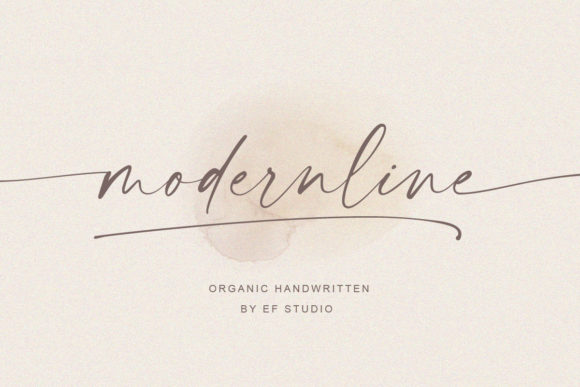
At its core, Modernline is a handwritten font defined by its elegant simplicity. The letterforms feature smooth, flowing lines with a natural, slightly varied baseline that mimics real handwriting without sacrificing legibility. The strokes are confident and consistent, avoiding the overly decorative swirls that can clutter a design. This gives it a modern typography feel—approachable yet refined.
The font includes a full set of gorgeous glyphs and stunning alternates. Accessing these stylistic options is straightforward thanks to its PUA encoding, meaning you can easily add flourishes to initial letters or create unique ligatures in programs like Adobe Illustrator, Photoshop, or even Canva. This flexibility allows you to tailor the font’s personality to your specific project, whether you need subtle elegance for a wedding invitation or a bolder statement for a social media graphic.
Where Modernline Truly Shines
The practical strength of Modernline lies in its adaptability. It functions brilliantly as a display font for headlines, logos, and hero sections where you need to grab attention with personality. Yet, it maintains enough clarity to be used in shorter paragraphs or pull quotes in editorial design.
- Brand Identity & Logo Design: For entrepreneurs and small business owners, Modernline can form the cornerstone of a brand identity. It injects warmth into a logo for a boutique, bakery, consultant, or creative studio. Pair it with a clean sans serif font for body text to create a balanced, professional look.
- Packaging & Product Design: On product labels, boxes, or hang tags, this handwritten font adds a tactile, artisanal quality. It communicates care and craftsmanship, which is invaluable for packaging design in the beauty, food, or lifestyle sectors.
- Digital & Web Design: Use Modernline for website headers, call-to-action buttons, or email newsletter banners. It breaks the monotony of standard web fonts and guides the user’s eye. Just ensure you test it at various sizes for on-screen readability.
- Social Media & Marketing: For content creators and marketers, Modernline is a powerhouse for creating engaging social media graphics. It makes quotes, announcements, and promotional posts feel personal and stylish, helping to boost audience engagement and recognition.
- Print & Editorial Projects: Think beyond digital. It’s excellent for magazine headers, book chapter titles, stationery, and event invitations. In publishing, it can add a distinctive touch to a title page or dedication.
Practical Guidance for Using Modernline
Choosing the right font is only half the battle; using it effectively is what matters. Here’s how to integrate Modernline into your workflow with confidence.
Evaluate the Project Fit: Before selecting any creative font, consider the project’s voice. Modernline’s personality is friendly, elegant, and modern. It suits projects aiming for a human, approachable, or upscale-casual tone. It might not be the best fit for a corporate law firm’s annual report, but it’s perfect for a lifestyle brand’s lookbook.
Master Font Pairing: The most effective designs often combine a script font like Modernline with a simpler counterpart. For maximum readability and hierarchy, pair it with a strong serif font for a classic feel or a geometric sans serif font for a sharper, more contemporary contrast. Use Modernline for the headline or key accent words, and let the paired font handle the longer text. This creates a clear visual hierarchy.
Test for Readability: Always conduct a readability check. View your design at the intended size and on the intended medium. At small sizes or on low-resolution screens, some of the finer swashes might become hard to discern. In such cases, opt for the simpler letterforms without alternates. The font’s smooth lines generally hold up well, but testing is a non-negotiable step for any professional project.
Explore the Included Styles: Don’t overlook the alternates and swashes. They are what elevate Modernline from a good font to a great design asset. Use them sparingly to add flair to a logo monogram, an initial cap, or a focal point in a layout. This customization prevents your work from looking generic and showcases the font’s full potential.
Understand the Licensing: Since Modernline is a commercial font, its license is designed for professional use. This typically covers use in logos, websites, printed materials, and merchandise for your clients or business. Always review the specific license terms to ensure your intended use—especially for items for resale like t-shirts or mugs—is covered. This protects you legally and supports the font’s creator.
In essence, Modernline is more than just a collection of letters. It’s a tool for adding genuine personality to your designs. By understanding its strengths—from its elegant baseline to its accessible alternates—and applying it thoughtfully across different media, you can create work that feels both professionally crafted and deeply human. It’s a reliable design asset for anyone looking to elevate their visual communication with a touch of modern, handwritten charm.